Jan 2025
Jan 2025
Bank Loan Installments' Improvement
Bank Loan Installments' Improvement
My Responsibilities
My Responsibilities
UX Research, UI Design, Prototyping, Evaluation, Stakeholder Management, Workshop Coordination
UX Research, UI Design, Prototyping, Evaluation, Stakeholder Management, Workshop Coordination
About the Company
About the Company
Digipay is a fintech company offering Iranian consumers Buy Now, Pay Later (BNPL) credit and bank loans for purchases on Digikala and partner merchants.
Digipay is a fintech company offering Iranian consumers Buy Now, Pay Later (BNPL) credit and bank loans for purchases on Digikala and partner merchants.
Overview
Overview
I redesigned the Bank Loan Installments experience to improve repayment clarity, reduce missed due dates, and make installment management more intuitive. The solution was driven by behavioral analytics, user interviews, and iterative usability testing.
I redesigned the Bank Loan Installments experience to improve repayment clarity, reduce missed due dates, and make installment management more intuitive. The solution was driven by behavioral analytics, user interviews, and iterative usability testing.
Discovery
Discovery
I noticed a recurring pattern: many users were missing installment due dates and struggling to manage their loan repayments.
To validate the issue, I reviewed behavioral data in Microsoft Clarity.
I noticed a recurring pattern: many users were missing installment due dates and struggling to manage their loan repayments.
To validate the issue, I reviewed behavioral data in Microsoft Clarity.
Findings
Findings
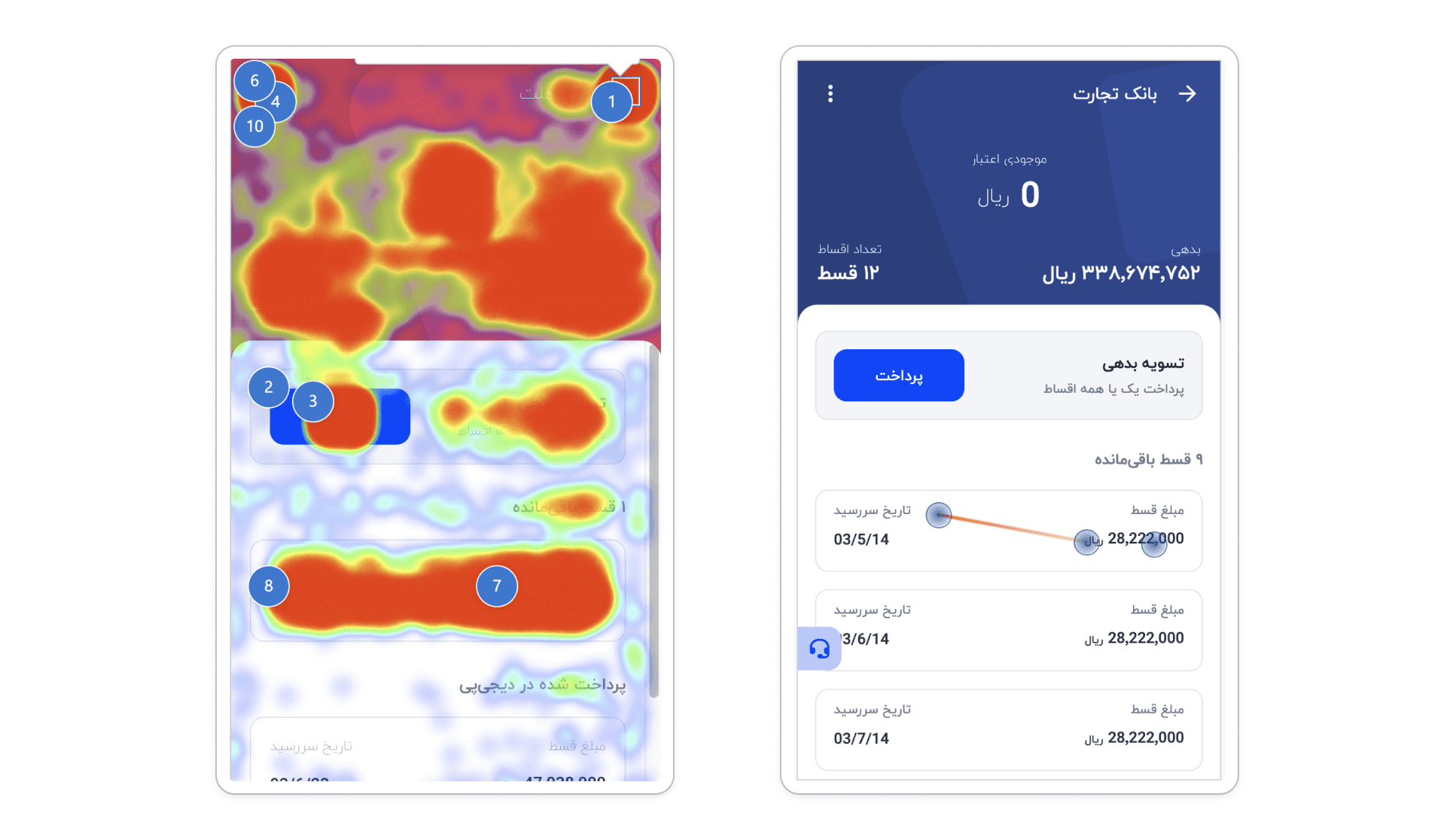
Users repeatedly attempted to click on installment cards that were not interactive, suggesting a mismatch between visual affordance and actual functionality.
There was also unusually high interaction on the loan card’s top section (balance area).
Users repeatedly attempted to click on installment cards that were not interactive, suggesting a mismatch between visual affordance and actual functionality.
There was also unusually high interaction on the loan card’s top section (balance area).
User Interview
User Interview
To understand the undarlying problems, I conducted interviews and uncovered a critical insight: the balance value displayed at the top of the loan card was not meaningful for most users. In practice, users typically spend the full loan amount immediately after activation, leaving the balance at zero. As a result, their primary goal in this section was not to check the balance, but to track, understand, and manage their installments.
To understand the undarlying problems, I conducted interviews and uncovered a critical insight: the balance value displayed at the top of the loan card was not meaningful for most users. In practice, users typically spend the full loan amount immediately after activation, leaving the balance at zero. As a result, their primary goal in this section was not to check the balance, but to track, understand, and manage their installments.
Iteration & Evaluation
Iteration & Evaluation
Design and Usability Testing
Design and Usability Testing
Based on these findings, I redesigned the Loan Home and the Installments List, shifting the experience toward installment visibility, clarity, and actionability. I then tested the redesigned flow through moderated usability sessions.
Based on these findings, I redesigned the Loan Home and the Installments List, shifting the experience toward installment visibility, clarity, and actionability. I then tested the redesigned flow through moderated usability sessions.
The first round of testing surfaced new usability issues:
Some users failed to notice their overdue debt on the loan home and instead went to the installments list to find it.
Some participants did not recognize the “Installments List” Button, assuming it was disabled due to low visual prominence.
The first round of testing surfaced new usability issues:
Some users failed to notice their overdue debt on the loan home and instead went to the installments list to find it.
Some participants did not recognize the “Installments List” Button, assuming it was disabled due to low visual prominence.
I iterated on the design through targeted ideation and refinement, addressing discoverability and information hierarchy issues. After implementing the improvements, I conducted a second round of usability testing, where the key issues were resolved and the flow performed as intended.
I iterated on the design through targeted ideation and refinement, addressing discoverability and information hierarchy issues. After implementing the improvements, I conducted a second round of usability testing, where the key issues were resolved and the flow performed as intended.
Final Design
Final Design
Loan Home Page
Loan Home Page
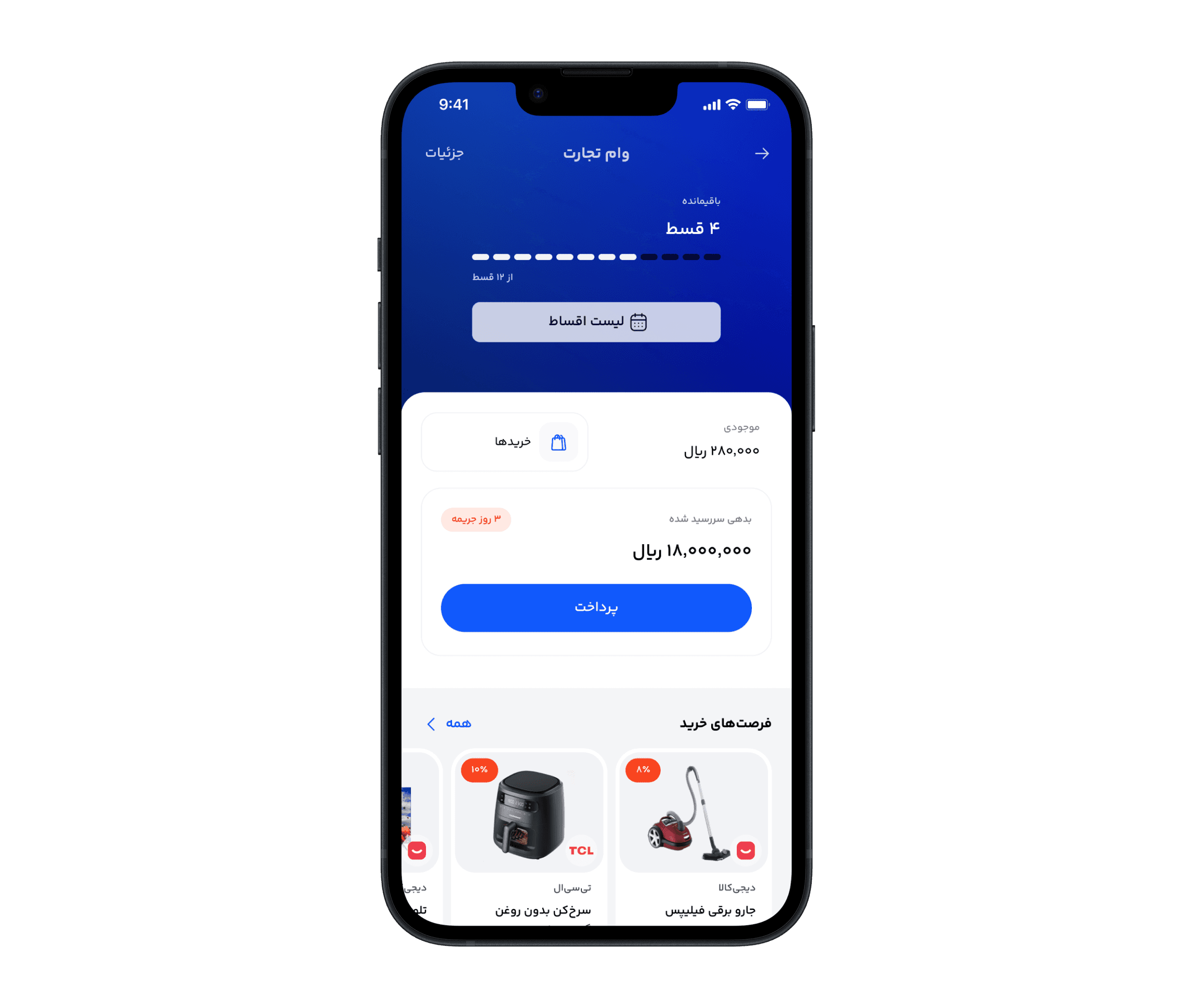
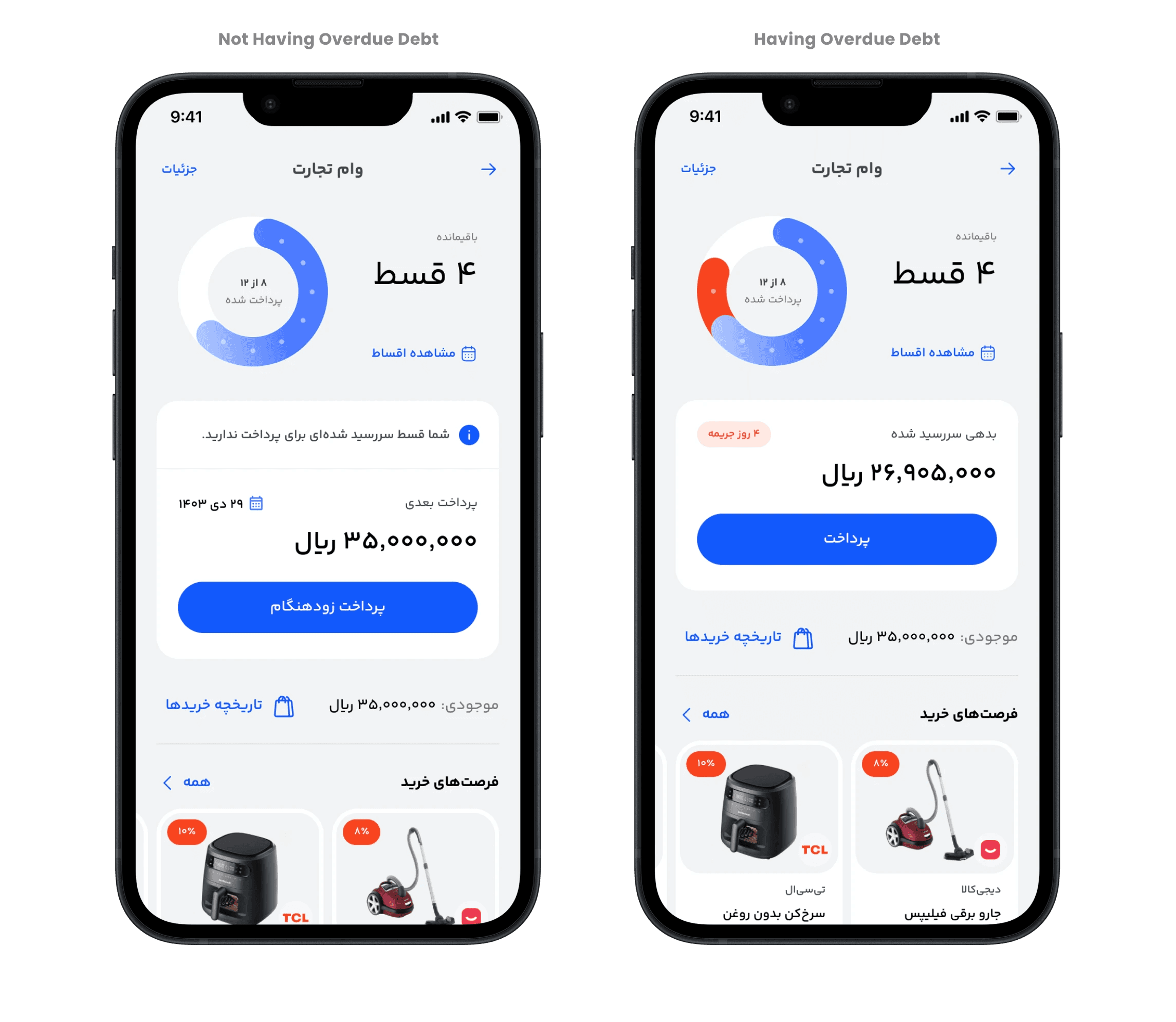
At the top of the page, a simple progress chart allows users to instantly understand how much of their loan has been repaid versus how much remains.
If the user has any overdue installments, they are highlighted in red on the chart, making repayment risk immediately visible at a glance.
The large text beside the chart also displays the number of remaining installments, and users can access full details by tapping “View Installments”.
In the middle of the page, a dedicated card enables users to pay the total overdue amount immediately (if any installments are overdue).
If there are no overdue installments, the same card allows users to make an early payment for the next upcoming installment.
If an installment is overdue, the user sees the number of penalty days accrued. If there are no overdue installments, the UI instead highlights the due date of the next upcoming installment.
At the top of the page, a simple progress chart allows users to instantly understand how much of their loan has been repaid versus how much remains.
If the user has any overdue installments, they are highlighted in red on the chart, making repayment risk immediately visible at a glance.
The large text beside the chart also displays the number of remaining installments, and users can access full details by tapping “View Installments”.
In the middle of the page, a dedicated card enables users to pay the total overdue amount immediately (if any installments are overdue).
If there are no overdue installments, the same card allows users to make an early payment for the next upcoming installment.
If an installment is overdue, the user sees the number of penalty days accrued. If there are no overdue installments, the UI instead highlights the due date of the next upcoming installment.
Installments List
Installments List
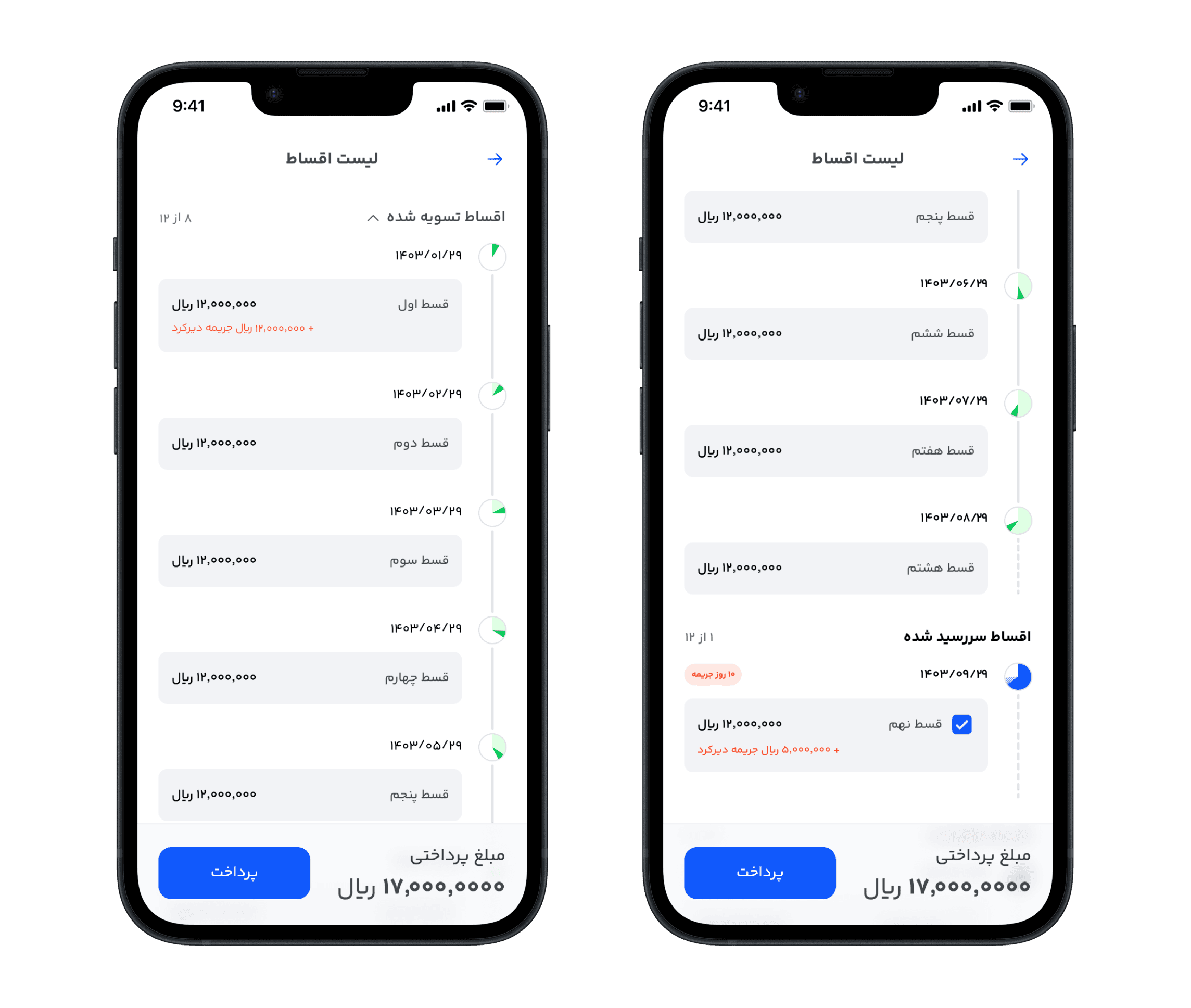
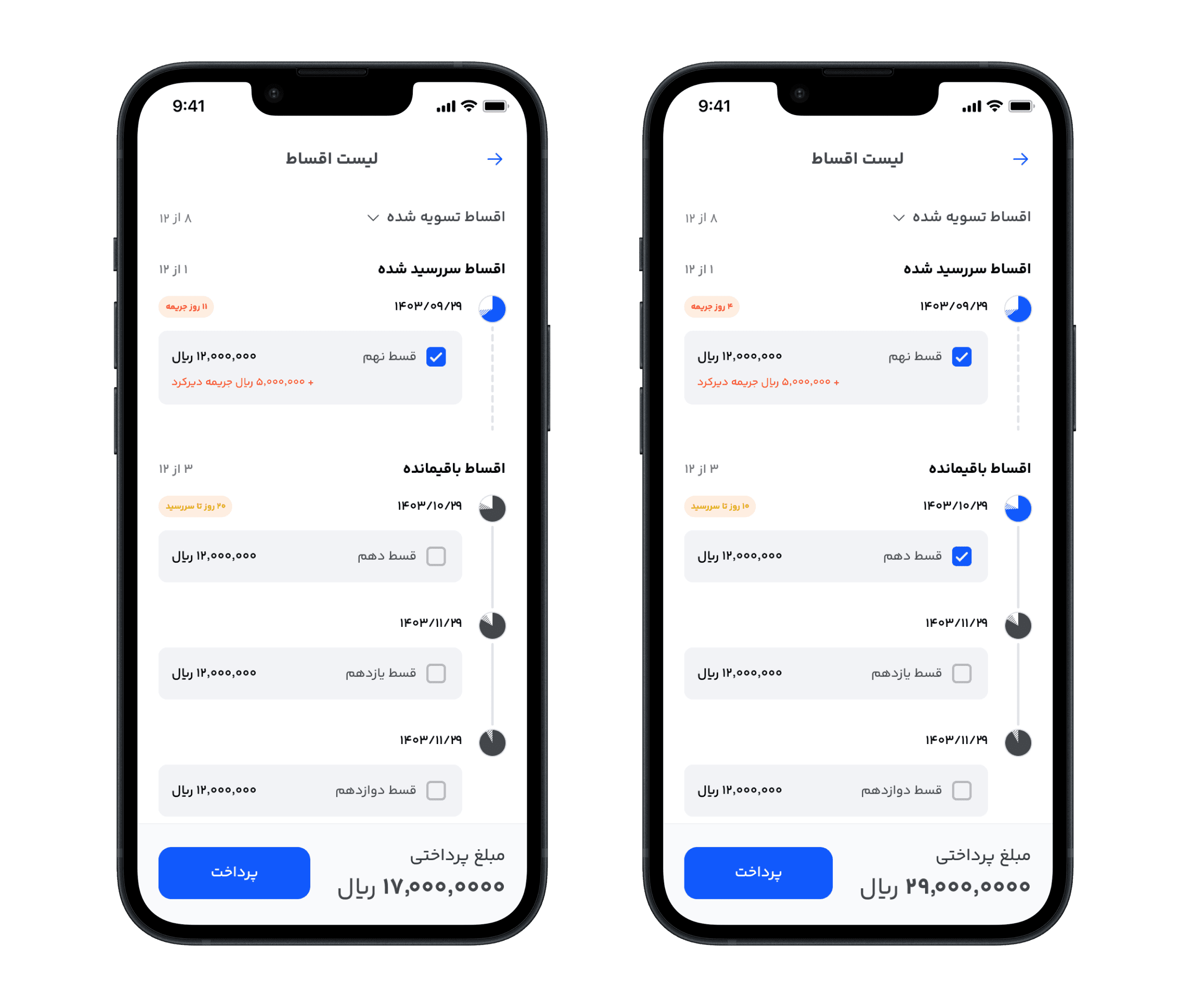
I designed the installments list as a timeline, where upcoming installments appear further down the list, while past installments are tucked away in a collapsible dropdown at the top of the page.
Next to the Paid, Overdue, and Remaining section titles, the UI displays the count of installments in each category, giving users a quick breakdown of their repayment status at a glance.
If any installment is overdue, it is selected by default, allowing users to take immediate action. Users can also include future installments for payment by selecting the checkboxes next to them.
For each installment, a small inline chart helps users quickly understand what portion of the total loan that installment represents.
I designed the installments list as a timeline, where upcoming installments appear further down the list, while past installments are tucked away in a collapsible dropdown at the top of the page.
Next to the Paid, Overdue, and Remaining section titles, the UI displays the count of installments in each category, giving users a quick breakdown of their repayment status at a glance.
If any installment is overdue, it is selected by default, allowing users to take immediate action. Users can also include future installments for payment by selecting the checkboxes next to them.
For each installment, a small inline chart helps users quickly understand what portion of the total loan that installment represents.
Repaid Installments
Repaid Installments
When users tap the “Paid Installments” dropdown, it expands and adds the list of completed installments to the top of the timeline in chronological order.
Tapping the dropdown again collapses the section and hides the paid installments.
When users tap the “Paid Installments” dropdown, it expands and adds the list of completed installments to the top of the timeline in chronological order.
Tapping the dropdown again collapses the section and hides the paid installments.